Powerful new tools are creating one of the biggest leaps forward we have ever seen in what technology can do for real people. Not just a little more productive – but faster, easier, and able to do whole categories of things that simply weren’t possible before.
Short on time. Long on ideas. Overloaded with files, screenshots, notes, and “I’ll organize this later.”
NEW TECH is about turning all of that into systems that actually help you think, create, and live your life.
Unlock a new level of mastery without adding another subscription.
Imagine a workflow where you can:
- Achieve the focus of your best days, instantly.
- Automate repetitive tasks and regain hours, not minutes.
- Master the digital tools you already have to do more in less time.
- Focus on your ideas, not on the admin.
Discover incredible workflows that feel like magic.
NEW TECH shows you simple shifts in approach that make your tools feel unbelievable compared to what you’re doing now. The tools that:
- Reduces mental clutter instead of adding to it.
- Removes friction and connects your concepts, giving you more time to think.
- Lets you speak, tap, or snap a picture instead of endlessly typing.
- Turns years of scattered content into something you can actually use.
This is about:
Speed
Tasks that used to take hours can now take minutes.
Ease
Fewer steps, less friction, more “it just works”.
Range
Creating visuals, lessons, plans, and systems that used not to be realistic for one person.
NEW TECH is for:
- People with too many ideas and no place to put them.
- Professionals trying to keep up with documents, meetings, screenshots, and projects.
- Educators, therapists, and helpers who want tech to support real humans.
- Parents and kids who need technology that supports learning and creativity.
You bring:
- Your messy folders
- Your screenshots
- Your voice notes
- Your half‑finished projects
NEW TECH brings:
- Clear, visual systems
- Simple, repeatable workflows
- Ways to let technology carry more of the load
No perfection. No starting over.
Just taking the real digital life you already have and giving it structure, power, and purpose.
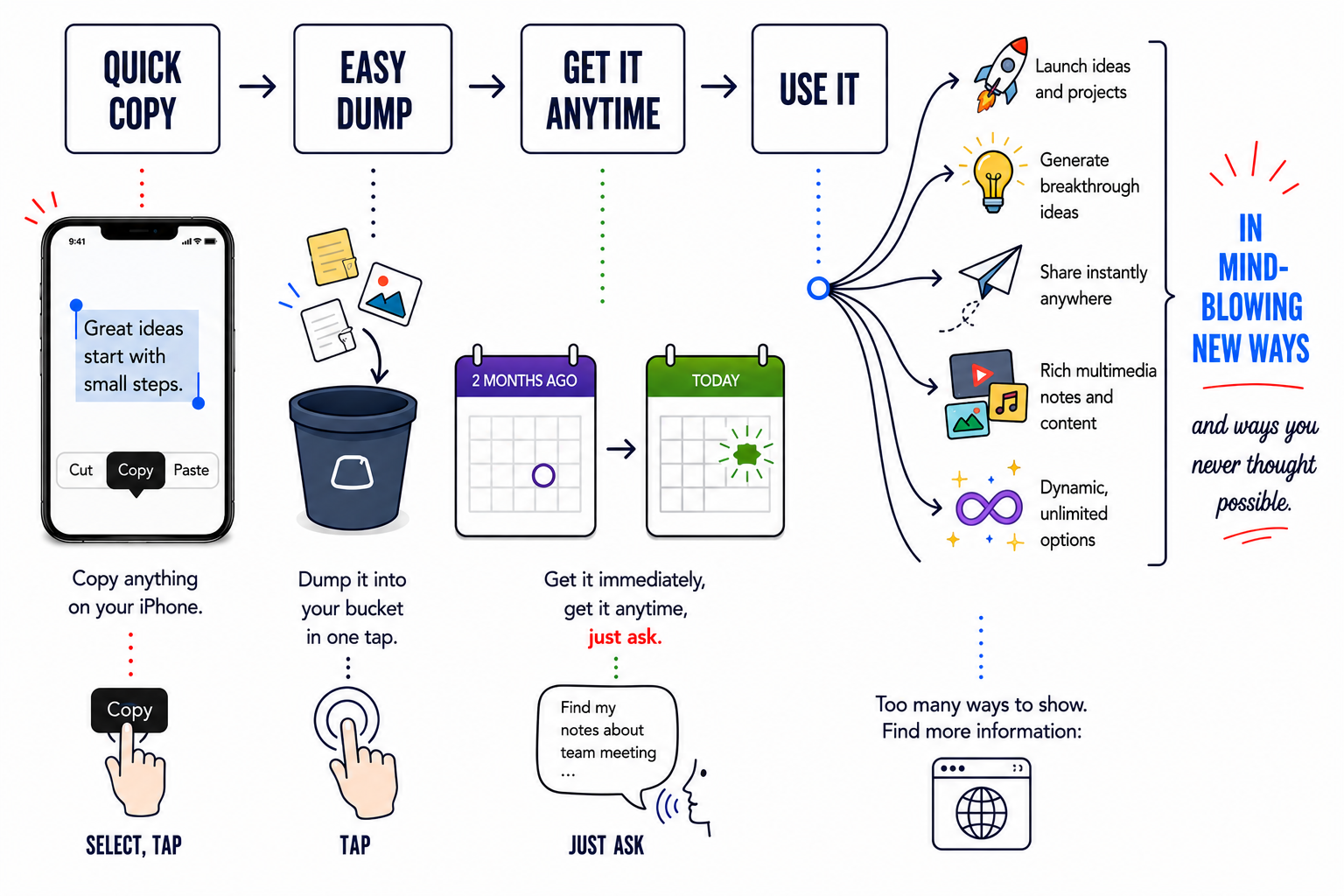
The "Dump It & Get It" System
A visual breakdown of how to capture your ideas instantly and retrieve them without the headache.
UPCOMING TOPICS
Capture Once, Find Forever
How to grab ideas, screenshots, and notes in a few seconds and store them so they can be searched, sorted, and reused later without hunting through dozen of apps.
The “Quick Dump” System
A simple way to off‑load everything from your head into a reliable place, even on your busiest days, so nothing important gets lost.
Building Your Personal Digital Memory
Turning photos, voice notes, and documents into a long‑term, searchable memory system that you can trust more than your own brain.
Screenshots With a Job
Using screenshots as a fast capture tool for reading, research, and inspiration, and then turning them into organized, labeled resources instead of digital clutter.
Voice‑First Note Taking
Using your voice to record and structure ideas, plans, and conversations so you can think out loud and still end up with clear, usable information.
Turning Recordings Into Teaching Materials
Transforming raw recordings into outlines, lessons, handouts, and step‑by‑step guides without starting from a blank page.
Visual Icons and Naming Systems
Designing a small set of icons and naming rules so your files, lessons, and projects are instantly recognizable at a glance.
Connecting Tools Into One Flow
Creating a smooth path from capture to storage to retrieval so your tools feel like one connected system, not a pile of separate apps.
Everyday Automation Without Coding
Letting the computer handle repetitive work like moving files, renaming items, and setting up basic routines so you can focus on thinking.
Technology for Real‑World Helpers
Setting up tech systems that work for educators, therapists, and support professionals who are constantly creating materials for others.
Systems That Grow With You
Creating foundations that can start small today and expand into courses, memberships, resources, or whole libraries as you’re ready.